Purchase Triggers, Phone Number Requirement Settings and Instructor Profile Pictures

We’re happy to announce a handful of new features to give you more control of student information, automate more purchases and improve the appearance of your on-demand pages.

Purchase Triggers

This powerful new feature allows you to trigger one more subsequent purchases, after an initial purchase. For example, you might have an intro pass that automatically converts into a monthly membership. You can add multiple purchase triggers to a single pass, and you can daisy-chain automations together, giving you an almost unlimited number of options.

You’ll now see an “Automated Payments” page within the Payment Center category where you can see all upcoming automated purchases, all completed automated purchases, and any cancelled or failed purchases. Anytime a student has an automation, we’ll display this in the purchases section of their profile page, and if you need to stop it, you can simply remove the automation.

As for the student side of things, any time a student purchases a pass with an automation, we’ll let them know which pass will be purchased, and when it will be purchased.

We hope the power and flexibility of this feature gives our customers all sorts of creative options for automating the different ways your students can participate with your studio and communities.

Optionally Require Phone Number

Some of our customers really want to be able to require phone numbers when students pay or register with their studio, so we’ve now made this an option. We now ask for phone number, and you can optionally decide whether or not to require it. The only user that can make this change is the account owner, by going to the “Basic Studio Settings” page.

Profile Pictures for Instructors and Admin/Desk Staff

Last month we released our new on-demand page, which allows your students to more easily access your video library. Because not all videos have cover images right away, the initial page view experience isn’t always great. Now, you can upload a profile picture to your instructor profile pages, and if a video doesn't have a cover image, we’ll display the profile image of the instructor who recorded the class.


New On-Demand Pages for Student Mobile App Sites

We’re excited to share that we’ve added a new page to the student mobile app sites (previously called the student url) where your students can now access all your audio and video recordings, as well as filter the recordings by file type, instructor and event tag. It provides great additional value for your members and is already set up and ready for your students to use. (As a reminder, you can see the url for your mobile app site on the website widgets page.)

New On-Demand Page

Every mobile app site now has a new page titled ‘on-demand’. Any audio and video recordings you have will automatically show up here, and until you upload a cover image will have a light yellow background in the video frame as shown below.

A video page with no thumbnail images

On-demand page without thumbnail images

On-demand page with thumbnail images

Admin Side - Event Recording Settings

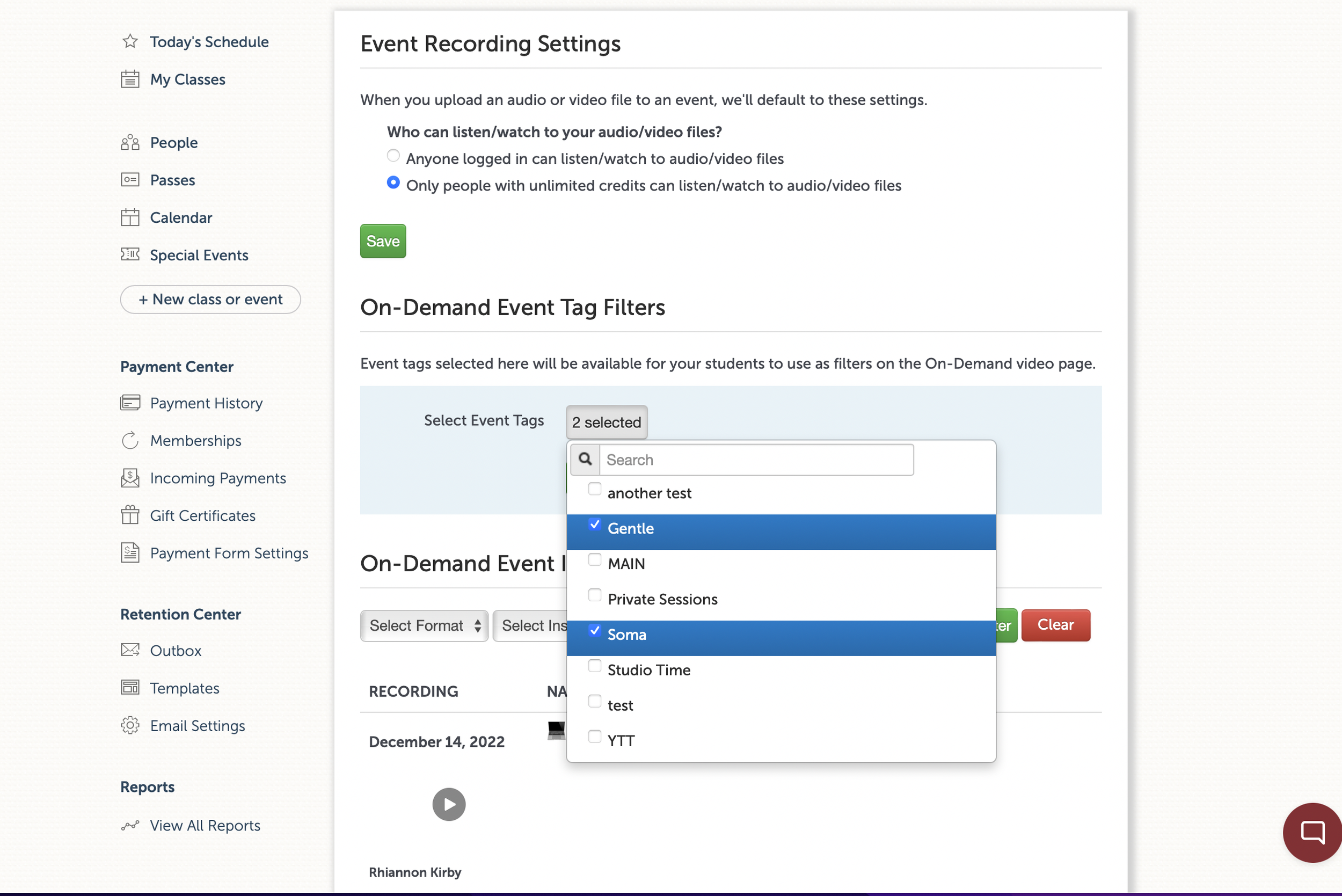
To begin customizing your on-demand page, visit the “Event Recording Settings” page in the studio menu on the administrator side of things. On this page, you’ll see a list of all your events with recordings, the tags they have on them at present, and a link out to the event so you can easily add/edit tags and upload thumbnail images should you desire.

Select the tags you want your students to be able to choose from

You’ll also see, just above the list of events with recordings, a section where you can choose which event tags you want to appear as options for your student to select from. This is super handy as you might have both internally meaning tags for things like custom calendars, but want to use different tags with a different naming convention for your students. This gives you maximum flexibility to set things up in the way that’s best for your studio and your students.

Event Page Updates

The event pages themselves where you can upload a recording of the event remain largely unchanged, however you’ll now see a section where you can upload a cover image in addition to uploading your recording.

Ready to use now!

These updates are available and in production for all of our customers now. Check it out, we hope you love it as much as we do!

Student Tags

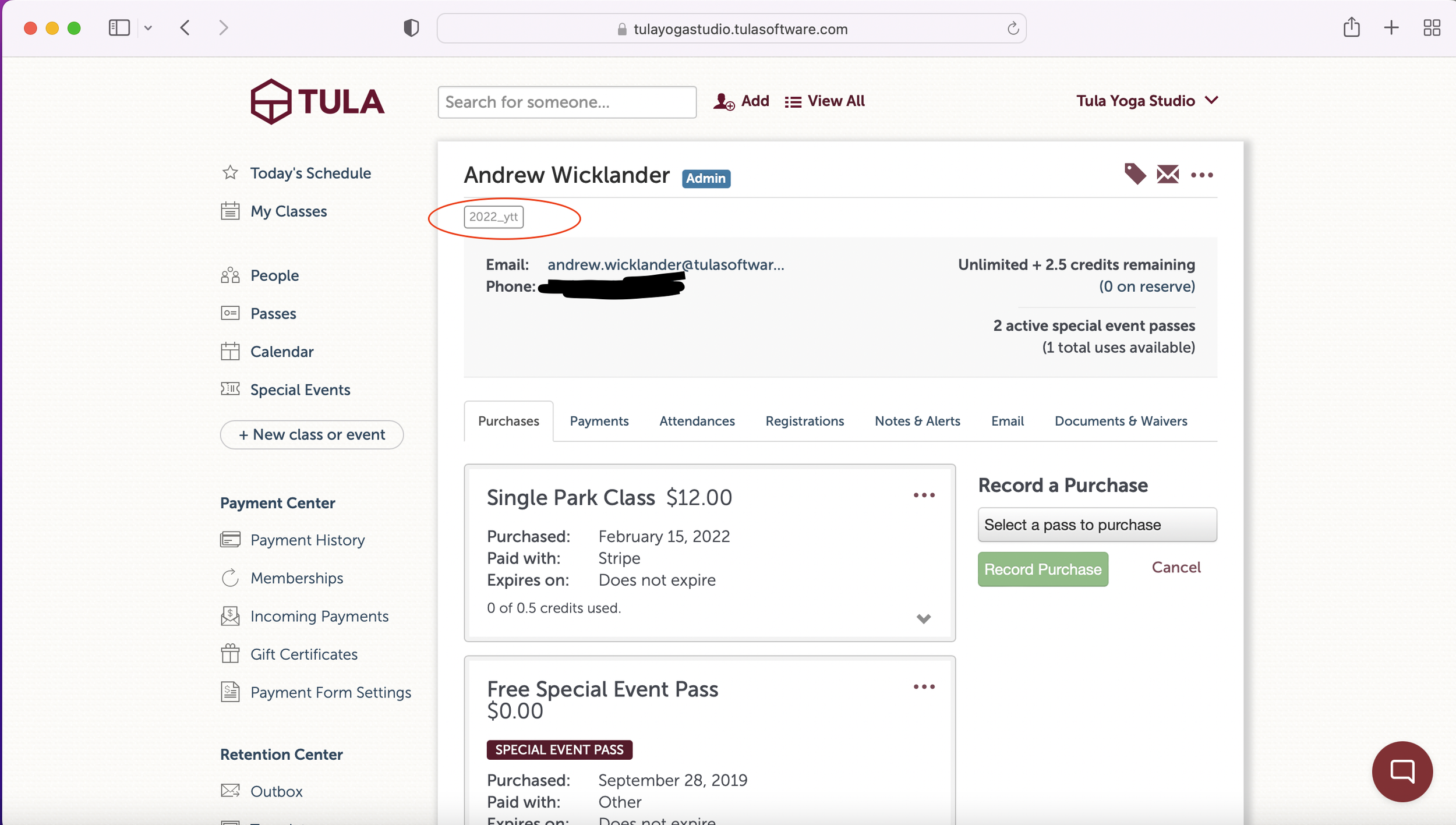
Good news! We’ve updated our tagging system so that in addition to tagging your events, you can now add tags to your students and other users at your studio. Tags on users are super useful for the times you want to group students together without having to rely on the passes they’ve purchased or the events they’re attending.

Easily add tags to users for things like teacher trainings, retreats, skill levels or as another example to indicate when someone is a local when your studio is frequented by tourists. Super useful for our customers in Hawaii and Aruba! 😍

How it works

The pattern for adding tags to users follows exactly the pattern for adding tags to events. Simply tap/click the tags icon while on the user in question, and add an existing tag or create a new one. To remove a tag, click the tag icon and delete the tag.

Like event tags, all the tags you create are available to be seen on the “studio tags” page which you can access via your studio menu. Once you’ve added tags to people, you can easily look up your students by tags in our reports, and of course email them as a group.

Tags are quick and easy to use, super useful and can help you communicate with your students more easily. Check it out!

Other misc. updates.

In addition to our tags system we’ve updated the find-a-sub feature to include class title when requests go out, along with shipping a handful of small bug fixes.

As always, more to follow next month and in the meantime email us with any questions!

New Feature: Require login on payment forms

Another month, another set of updates! Like last month, we’ve spent some more times on our payment forms and Captcha, in particular giving our customers the option of requiring login to proceed with making a payment.

Generally speaking we recommend allowing anyone to make a payment, even if they’re not logged in. In fact, this capability is one of our founding principals: that people should be able to interact with your business without first having to sign up for an account.

There are however a handful of circumstances you might want to require people to log in. One area we’ve been focusing on lately is bot prevention, and as we mentioned last month we’ve added captcha to all our payment forms for logged out users. While it’s rare, bots can still at times get past Captcha prevention. In the unlikely event a bot successfully starts spamming your payment forms even with Captcha in place, now you have another line of defense and can put up a “log in wall”.

Additionally, our customers in the European Union are now subject to Secondary Customer Authentication requirements, and these secondary authentications usually expire in 1 hour. So if a logged out user makes a payment in Europe, there’s a good chance it’ll fail if it’s not matched within an hour. For these studios, depending on how quickly you’re able to match payments, it might make sense to require people sign in before making a payment as those are processed immediately.

In addition to the login options, we’ve also updated the language around your captcha selection options to indicate that you’re choosing between using v2 captcha and v3 captcha, made some nice updates to the website widgets page to more prominently display your mobile app site url, and shipped a number of other small bug fixes and system updates.

More updates to follow next month!

Latest System Updates!

We’ve released a number of small updates over the past few months that collectively deserve to be called out for our customers. Coming out of last year where we made a lot of large updates, we’ve been spending a bunch of time on a lot of “little” things the first few months of this year. We’re constantly releasing updates so you may have noticed some of these already but we hadn’t formally announced these yet - check out all the updates below.

Virtual & In-Person Registration Counts

We released our Hybrid Registration system last summer, but there were still a handful of places where we weren’t separately calling out the number of in-person vs. virtual registrations and attendances - namely on the “Today” page. That’s now updated!

Permissions Updates

We’ve updated the permissions so that users with the role of Instructor and above can update the broadcast url filed on events. Previously users had to be a Desk or Admin user to make this update, and this change should help some studios with their workflow around getting your Livestream events started.

Added Captcha to Payment Forms

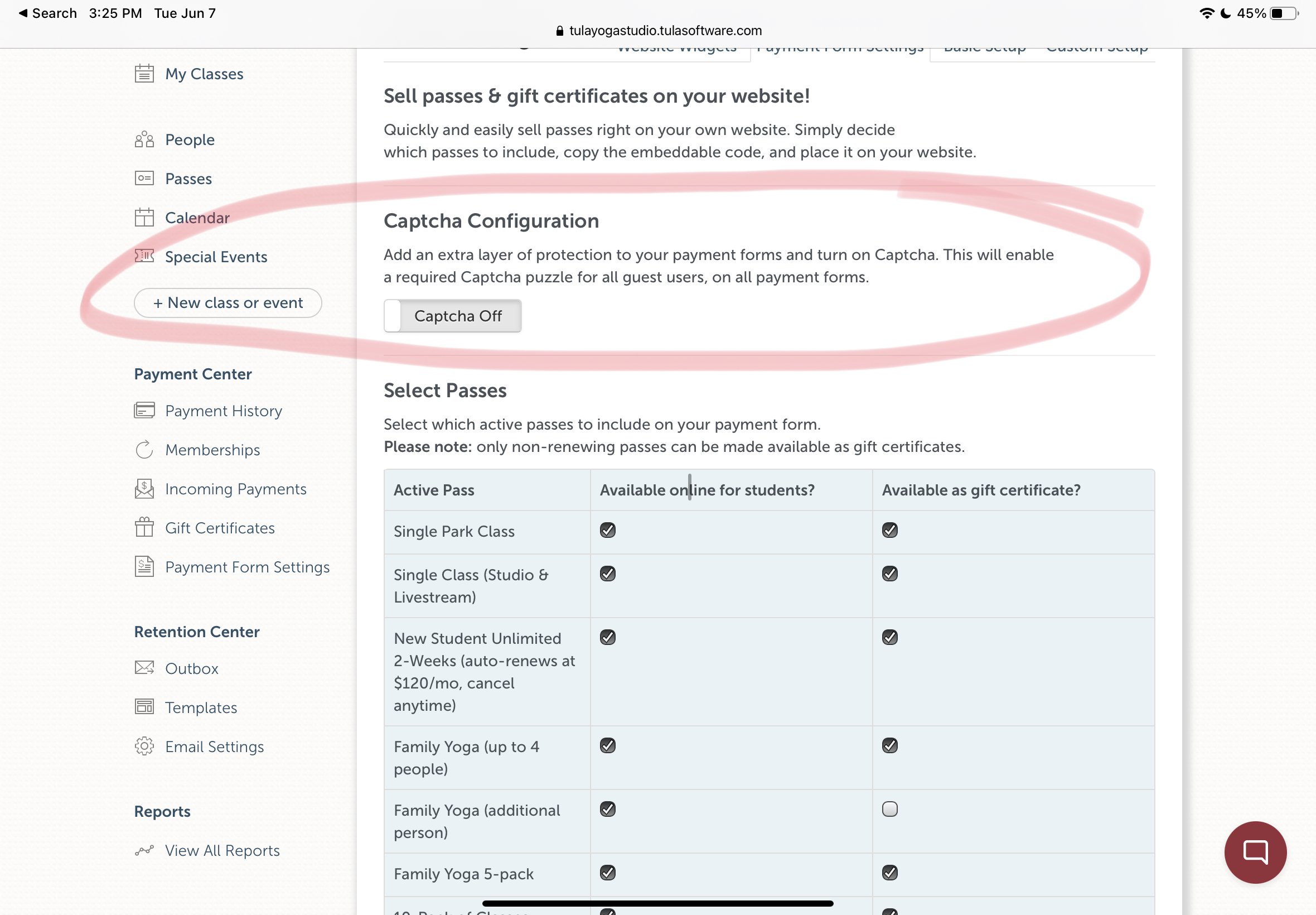
On a few occasions we’ve had to deal with bots hitting customer payment forms. We’ve updated our payment forms to include invisible captcha to prevent bot spam, and for an extra layer of protection you can optionally turn on “checkbox captcha” on your payment form settings page, which will require users to solve a captcha image puzzle before proceeding with making a payment.

Bug Fixes and General Maintenance

In addition to the above we’ve also squashed a number of small bugs, and have also made some updates to the infrastructure which allows our customers to host our widgets on their own domain. A small handful of customers were seeing degraded performance with their widgets and we were able to track down and resolve the issue.

More to come soon!

We’re always working hard to improve the system, and we’ll have more updates to share soon!